 DASAPT
 Xinren Chen
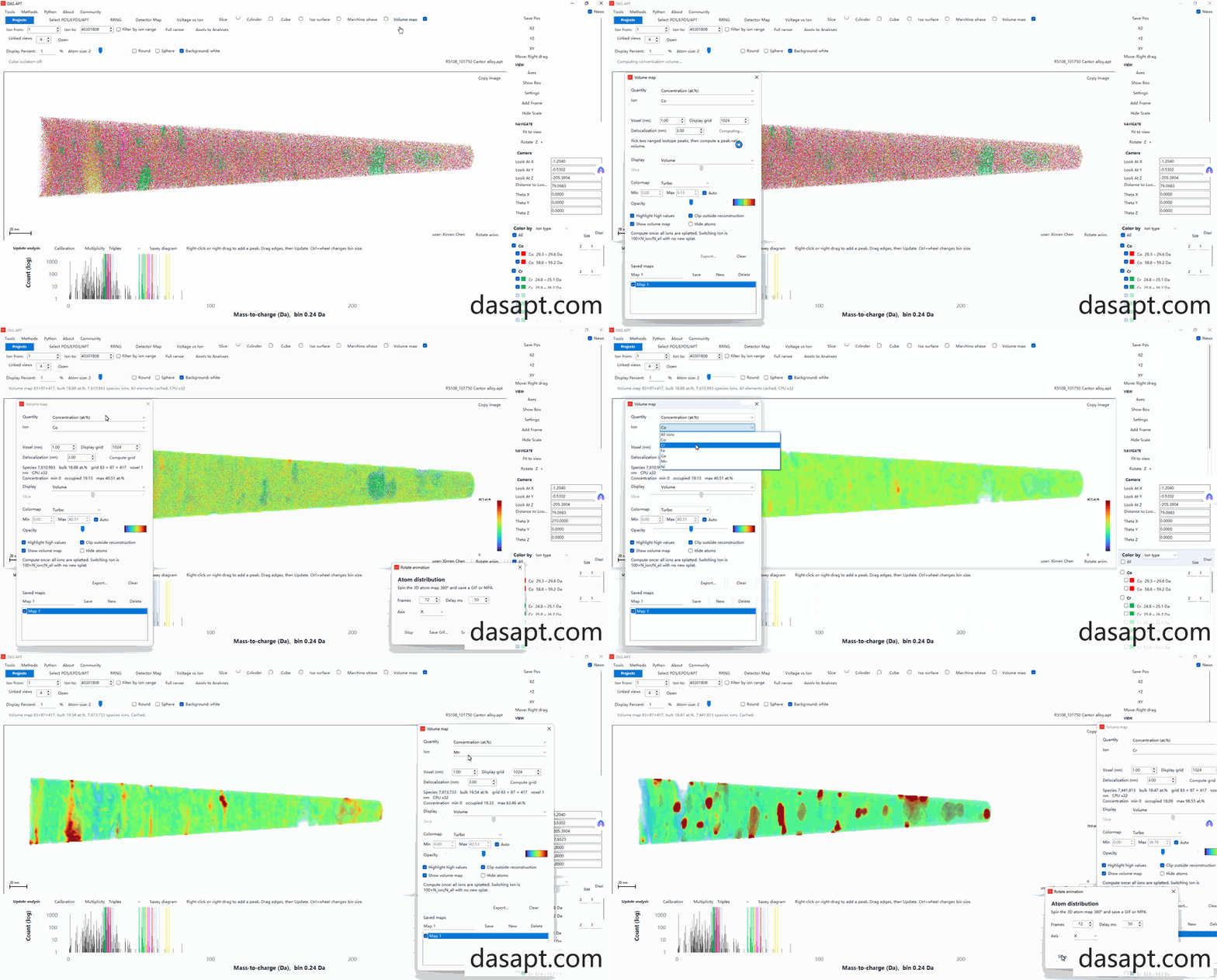
DASAPT can render a volume map through the reconstructed needle: concentration (at.%), ion density, peak ratio, or multiplicity density on a voxel grid with Gaussian delocalization. Several saved maps can stay in the project and be shown together.
Volume map
- Load a reconstruction (
.pos,.epos, or.apt) and an.rrngwhen you need element or peak ranges. - On the toolbar, open Volume map and tick the checkbox beside it when you want the overlay in the 3D view.
- Pick Quantity (concentration, density, peak ratio, or multiplicity density), the ion or peaks, Voxel (nm), Display grid, and Delocalization (nm), then click Compute grid.
- Choose Display (volume or slice), colormap, opacity, and Min/Max. Highlight high values and Clip outside reconstruction are optional.
- Use New / the saved list to keep more than one map; check a row to show that map.
- Rotate animation on the 3D view can export a GIF or MP4 of the current scene.
Concentration maps cache all ranged elements after one compute; switching the ion recomposes the grid without rebuilding every species.
DASAPT 可以在重构针尖上显示体素图:浓度(at.%)、离子密度、峰比值或多重度密度,网格上带高斯离域。项目里可以保存多张体素图,并同时显示。
体素图
- 载入重构数据(
.pos、.epos或.apt);需要元素或峰范围时载入.rrng。 - 点工具栏 Volume map;要在三维里叠加体素图时,勾选按钮旁的小框。
- 选择 Quantity(浓度、密度、峰比或多重度密度)、离子或峰、Voxel (nm)、Display grid 和 Delocalization (nm),再点 Compute grid。
- 设置 Display(体渲染或切片)、色标、透明度和 Min/Max。可按需勾选 Highlight high values 和 Clip outside reconstruction。
- 用 New 和保存列表保留多张图;勾选某一行即可显示该图。
- 三维视图上的 Rotate animation 可以把当前画面导出为 GIF 或 MP4。
浓度图在计算一次后会缓存各元素;切换离子时只重组当前物种,不必重算全部元素。
0 comments
Sign in to comment.