 DASAPT
 Xinren Chen
DASAPT 4.1.14 can build the reconstruction up in layers. Atoms that are already on screen stay, and each step adds the next thickness along the axis you choose.
https://dasapt.com/forum/download
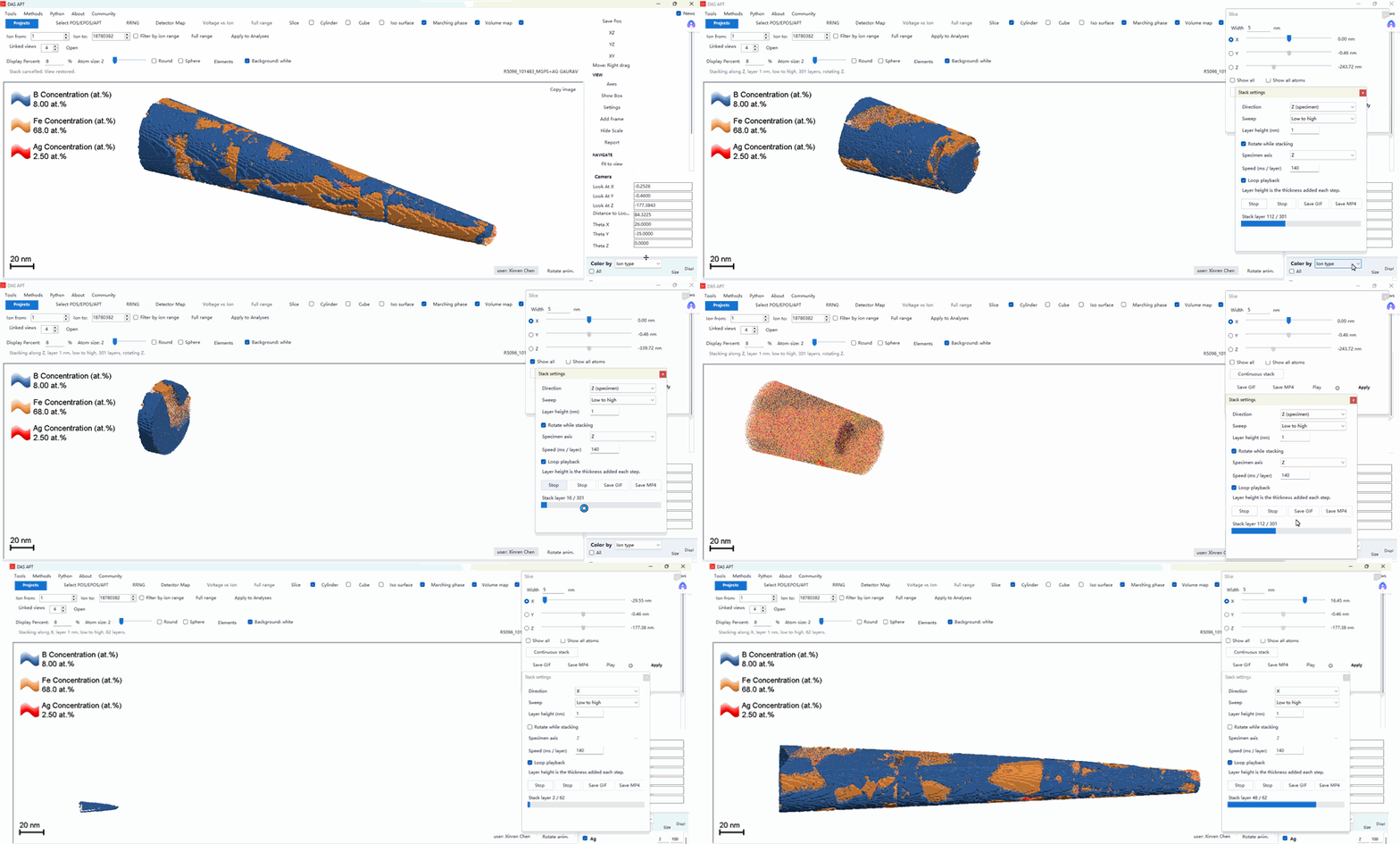
- Load a reconstruction. Leave on the atoms, iso surfaces, and volume maps you want. They are cut with the tip.
- Open Slice, then click Continuous stack. The Stack settings window stays open.
- Set Direction to X, Y, or Z (specimen), and Sweep to Low to high or High to low.
- Layer height (nm) is the thickness added at each step. This is not a thin slice that moves through the specimen. Earlier atoms remain, so the tip grows.
- Check Rotate while stacking to spin about the specimen axis (X, Y, or Z), not the screen. You can still turn the main view with the mouse. Speed (ms / layer) sets the pace. Loop playback repeats until you stop.
- Click Play. The bar reads Stack layer i / n. The status line names the axis, the layer height, the sweep, and the rotation.
- Stop, or closing the window, puts the view back to the way it was before Play.
- Save GIF or Save MP4 writes the same movie. The scale bar is included.
In the clip, a tip with B, Fe, and Ag concentration maps grows along Z at 1 nm per layer while it rotates about Z, then along X without that extra spin.
中文
DASAPT 4.1.14 可以沿一根轴把重构一层一层堆出来。已经显示的原子会留下,每一步只加上下一层厚度。下载:https://dasapt.com/forum/download
- 载入重构。勾上要看的原子、等值面和体密度图。它们会和针尖一起被切开。
- 打开 Slice,点 Continuous stack。Stack settings 窗口保持打开。
- Direction 选 X、Y 或 Z (specimen)。Sweep 选 Low to high 或 High to low。
- Layer height (nm) 是每一步增加的厚度。这不是一片在样品里移动的薄片。先出现的原子留在画面上,针尖逐渐长出来。
- 勾选 Rotate while stacking 时,样品绕自己的 X、Y 或 Z 轴转,不是绕屏幕转。播放时仍可以用鼠标转主视图。Speed (ms / layer) 是每一层停留的毫秒数。Loop playback 会循环,直到你停止。
- 点 Play。进度条显示 Stack layer i / n。状态栏会写出轴向、层厚、扫描方向和旋转。
- 点 Stop,或关掉窗口,视图会回到 Play 之前的样子。
- Save GIF 或 Save MP4 导出同一段动画,图里带比例尺。
动画里是一根带 B、Fe、Ag 浓度图的针尖:先沿 Z、每层 1 nm、绕 Z 旋转堆起来,再沿 X、不额外旋转。
0 comments
Sign in to comment.